What is Torrenting? #
When we download a file from the internet, we typically get it from a single server. This follows a client-server model where the server hosts the file, and the client (your computer) requests and downloads it. If the server is slow or overloaded, your download speed can be affected. But Torrenting uses a different approach called peer-to-peer (P2P) file sharing. The basic concept of is to share the data between everyone who has the file and download it, without relying on a single server.
This is how it works practically and technically. Imagine that you are downloading a 1GB file. First, the file is broken into small pieces called “Chunks”. What your machine does is to request those pieces from many other Peers (users) who are online at that time at once. It takes a part (data packets) from each peer to make the complete file. For example, you might download 100MB from one peer, 200MB from another, and so on until you have the full 1GB file.
This means that the download speed is not limited to the capacity of a single server. The more people there are, the faster the speed will be because you can get pieces from multiple sources simultaneously. If one person goes offline, the download will not stop because the others have the pieces of the file.
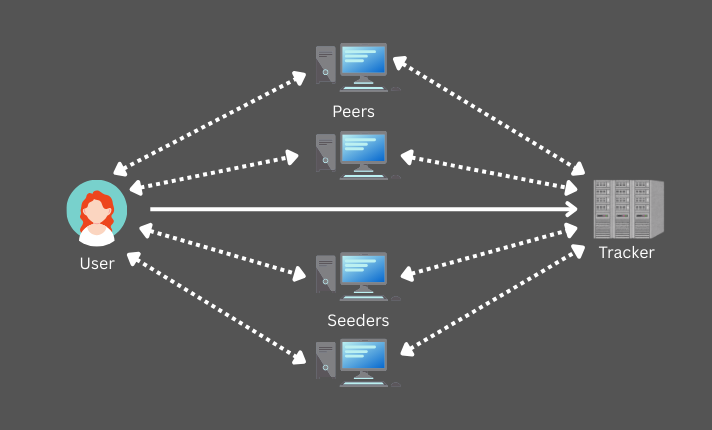
This is the basic idea of torrenting. Next, let’s talk about the two main parties involved in torrenting: Seeders and Leechers.
Seeders and Leechers #
Earlier we mentioned that there are no servers for data hosting in torrenting. People share files directly with each other. We can divide the participants in a torrent network into two main categories, Seeders and Leechers. Technically, this is the difference between those who have the complete file and those who are still downloading it.
Seeders #
First, let’s look at Seeders. A Seeder is someone who has already downloaded the file 100% and continues to upload it for others to download (Seeding). A torrent lives because of these people. Because only they have the complete parts of the file. Therefore, when we choose a torrent file, we always want to look for the one with the most Seeders. Because only when there are more people to share it, we can download at maximum speed.
Leechers #
Next are Leechers (also called Peers in some places). These are people who are still downloading the file. But there is an important technical point. Leechers are not just people who download. According to the torrent protocol, when you’re 20% done downloading a file, you can also upload the parts you’ve already downloaded to other Leechers who need them. This means that even Leechers contribute to the sharing process. After downloading the complete file, they can choose to become Seeders by continuing to upload the file for others. If they stop uploading after downloading, they are often referred to as “Free Riders” or “Hit-and-Runners”.
Torrent Trackers #
Now we understand that in torrenting, there are Seeders and Leechers sharing files directly. But the question is, how do they know exactly who is online at this time? Who has the file? What pieces do they have? What us their IP address? The intermediary that helps with this is called a Torrent Tracker. Simply, a Tracker is a bridge that connects everyone to share the file.
Technically, this is how it works. A Tracker is a special server. But remember, this server does not have the file we are looking for. It only has a list of the IP addresses of people who have that file and are downloading it. As soon as you open a torrent file, the first thing your torrent client (like qBittorrent) does is talk to this Tracker server. Then the tracker says, “Here are the IP addresses of people who have the file you want.”
After receiving that list, your machine connects directly with those Seeders and exchanges data. Here, the data does not go through the tracker. The tracker only does handshaking between leechers and seeders.
This is like Uber/Lyft. Even though you find a driver through the app, the journey does not take place within the app, but in the driver’s car. The app only connects you with the driver.
But there is a small problem with this method. If for some reason the tracker server goes down or gets blocked, we will not be able to find the Seeders because there is no way to get that list. To solve this problem, there is Magnet Links, which uses a Distributed Hash Table (DHT) system.
graph TD
    %% Define Nodes
    User((User))
    Tracker[Tracker
Server]

    %% Define the Swarm Cluster
    subgraph Swarm [Swarm Network]
        direction LR
        P1(Peer
50%)
        S1(Seed
100%)
        P2(Peer
75%)
        S2(Seed
100%)
    end

    %% Step 1: User connects to Tracker (Thick Arrow)
    User ==>|Step 1: Request| Tracker

    %% Step 3: Tracker provides Peer IPs to the Swarm/User
    %% Note: We link Tracker to the Swarm members to represent the connection shown in the image
    Tracker -.->|Step 2| P1
    Tracker -.->|Step 2| S1
    Tracker -.->|Step 2| P2
    Tracker -.->|Step 2| S2

    %% Step 4: Data Exchange (Bi-directional)
    User <-->|Step 3| P1
    User <-->|Step 3| S1
    User <-->|Step 3| P2
    User <-->|Step 3| S2

    %% Styling to match the image colors
    classDef userNode fill:#F4D03F,stroke:#D68910,stroke-width:3px,color:white;
    classDef swarmNode fill:#F4D03F,stroke:#D68910,stroke-width:2px,color:#2E86C1;
    classDef trackerNode fill:#BDC3C7,stroke:#7F8C8D,stroke-width:2px,color:white;

    class User userNode;
    class P1,S1,P2,S2 swarmNode;
    class Tracker trackerNode;

    %% Link Styling
    %% Link 0 is the thick User->Tracker line
    linkStyle 0 stroke:#B7950B,stroke-width:4px;

    %% Links 1-4 are Tracker->Swarm (dashed/thin)
    linkStyle 1,2,3,4 stroke:#95A5A6,stroke-width:1px,stroke-dasharray: 5 5;

    %% Links 5-8 are User<->Swarm (orange/active)
    linkStyle 5,6,7,8 stroke:#F1C40F,stroke-width:2px;
Magnet Links #
A Magnet Link is a special type of link that allows you to download files using torrent technology without needing a traditional .torrent file or a central tracker server. Usually when we download a .torrent file, the address of the tracker server is hardcoded inside it.
But a Magnet Link does not have such a server address. It only contains the hash of the file you want to download. This hash is what we call a digital fingerprint. Simply put, when you click on a Magnet Link, your Torrent Client does not look for a server, but directly looks for who has the file that matches that hash.
This is where a technology called DHT or Distributed Hash Table is used. There is no middle server here. Every Peer that is online acts like a small tracker. Your machine asks other Peers, “Who has the file with this hash?” Then, if they don’t know, they ask other Peers that are connected. This just goes like a chain and finally finds the person who has the file.
If we take the Uber example we talked about earlier, this is like a decentralized thing where drivers on the road get together and call each other and find us a car, without the Uber server.
How to Use Torrenting? #
To use torrenting, you need a Torrent Client software. Some popular ones are qBittorrent, uTorrent, and Transmission. Here are the basic steps to get started:
- Install a Torrent Client: Download and install a torrent client of your choice.
- Find a Torrent File or Magnet Link: Go to a torrent website and search for the file you want. You can either download the
.torrentfile or copy the Magnet Link. - Open the Torrent in Your Client: If you have a
.torrentfile, open it with your torrent client. If you have a Magnet Link, paste it into your torrent client. - Start Downloading: Your torrent client will connect to Seeders and start downloading the file in pieces.
- Seeding: After the download is complete, consider leaving your torrent client open to upload (seed) the file for others.
- Stay Safe and Legal: Always ensure that you are downloading and sharing files legally. Avoid copyrighted material unless you have permission to share it.
- Use a VPN: For added privacy and security, consider using a VPN while torrenting to hide your IP address and encrypt your internet traffic.
Using Seedbox services #
A Seedbox is a server that we rent in a Data Center in another country, which is golden, has 24-hour electricity and high-speed internet. This is like a supercomputer that you rent in another country to do your work.
This works very neatly. You log in from your browser at home and give the torrent file or magnet link of the movie you want to this Seedbox. Since this box has a crazy speed of 10-20 Gbps, even a gigabyte file is downloaded to its hard disk within a few seconds. After the file is downloaded, you can turn off your home machine. Because that Seedbox server continues to upload (seed) the relevant file to others. Due to this, your Upload Ratio continues to increase without any impact on your home electricity bill or data.
Now the question arises as to how we can view the file downloaded to the Seedbox. There are two main methods for that.
The first method is to use FTP (File Transfer Protocol) software and download the file from the Seedbox directly to your home machine. Then, even if the ISP blocks torrents, there will be no problem because it will come as a normal download. The second method is to run something like Plex on the same server and stream the file directly like watching Netflix without downloading it to your home. Either way, the world will see the Seedbox’s IP, not your IP, so security is also maximum.